How to Create Newspaper Clipping Images in Chronicling America, Programmatically
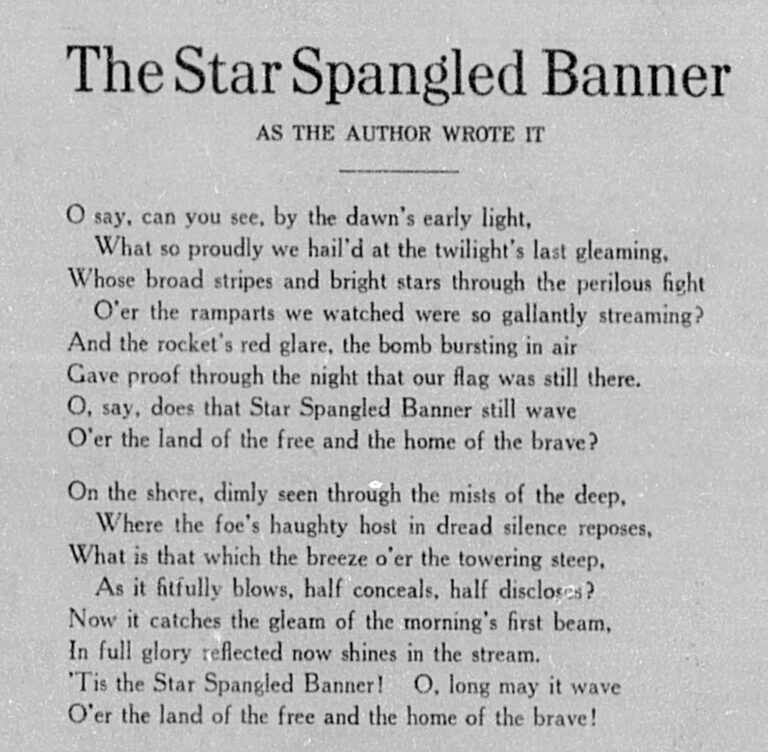
I ran into a particularly challenging problem recently. It had to do with one of my forays with the Chronicling America API. I needed to create images of newspaper clippings from a subset of Chronicling America’s digitized pages. I needed to produce tens of thousands of them for an interactive display. I’d already identified the clippings as OCR text (a different problem altogether). But I needed the images of those clippings, not just the text.
I’m sure there are at least a few scholars and programmers who have dealt with this challenge before. Yet I couldn’t find any pipelines or documentation explaining how they dealt with it. I’m also sure there will be other scholars who run into this challenge, too. In many cases, the OCR text is not the endpoint for researchers or educators. Sometimes, you need the image of the newspaper to drive home your points or to bring viewers closer to the original medium.
In this post, I outline my pipeline for extracting these clipping images. I’ve added some steps for demonstrative purposes, but if you’re just curious about the logic behind identifying and extracting images, feel free to scroll past the first parts of this walkthrough. By the end of it, you should have a better sense of how Chronicling America structures its image files and how to extract parts of them based on word or text locations on the page.
1) Libraries and Data
In this walkthrough, I’ll show you how to:
- navigate the Chronicling America manifest files and XML files
- scrape the necessary data for clipping images
- cross-reference and extract a given text from the XML version of the newspaper pages
- turn the XML version of the extracted text into the JPG image version
For demonstrative purposes, I’ve provided a toy dataset composed of three newspaper pages. These pages all contain a noteworthy text: the Star-Spangled Banner. This toy dataset represents what a lot of initial data scraped from Chronicling America looks like. That is, it’s just the newspaper title, the URL to the given newspaper page, and the date of the newspaper issue. You might end up with this kind of data after scraping search results, for example. These sorts of pulled data can be really useful for all sorts of downstream tasks. In this case, we’ll be using this data as an entry-point into the rest of the API.
But first, you’ll need to load the following Python libraries and the toy dataset, too, of course.
import requests
import re
import pandas as pd
import time
from lxml import etree
import json
from bisect import bisect_right
from collections import defaultdict

data = {
    'newspaper': [
        'The New Hampshire gazette',
        'Wisconsin herald',
        'Butler citizen'
    ],
    'base_url': [
        'https://www.loc.gov/resource/sn83025588/1814-10-11/ed-1/?sp=4',
        'https://www.loc.gov/resource/sn87082161/1845-06-14/ed-1/?sp=2',
        'https://www.loc.gov/resource/sn86071045/1887-07-01/ed-1/?sp=2'
    ],
    'date': [
        '1814-10-11',
        '1845-06-14',
        '1887-07-01'
    ]
}

df = pd.DataFrame(data)2) Chronicling America URL Structures and Scraping
Throughout these processes, we’ll be manipulating Chronicling America’s URL structures. These URL structures allow us to reach the parts of the API and the newspaper pages relevant to us. Chronicling America’s URLs contain a lot of information. They also follow strict patterns. In our toy dataset, you’ll notice the base_url column. It contains URLs to specific newspaper pages. These URLs are all structured as follows:
https://www.loc.gov/resource/{sn_code}/{year}-{month}-{day}/ed-{edition_no}/?sp={page_no}
The sn_code refers to Chronicling America’s unique identifier for the given newspaper. The year, month, and day refer to the given page’s date of publication. The edition_no refers to the iteration of digitization in Chronicling America. This is usually the first iteration, but sometimes, the same newspaper page is digitized and added to Chronicling America more than once–in which case the edition_no might be two, three, etc. The page_no refers to the page of the given newspaper issue. Most newspapers have between four and twelve pages, so the page_no usually falls within that range.
So, when you have the base_url to specific pages in Chronicling America, you also have a lot of data about that page, and you can use this data to navigate other parts of the API. To get to the clipping image URLs, you’ll need to repurpose this data a couple times over. In particular, you’ll need to use it to point to Chronicling America’s manifest pages, and then from the manifest pages, to the XML pages. This roundabout way of navigating the API is necessary because, unfortunately, the base_urls do not have all the necessary data to create the clipping images. More on that below. But first, a brief note on manifest pages and XML pages:
Every newspaper issue in Chronicling America has a manifest. These manifests are basically lists of the files included with their given digitized newspaper issue. These manifests are provided as JSON files. They contain things like the URLs for the PDF version of the newspaper pages, the JPG version of the newspaper pages, the XML version, and so on. The manifests themselves have their own URLs, too. For example, here’s the manifest for the first newspaper issue in our toy dataset: https://www.loc.gov/item/sn83025588/1814-10-11/ed-1/manifest.json.
If you review that URL carefully, you’ll notice it contains most of the same data as our base_url: sn_code, year, month, day, and edition_no. It doesn’t have the page_no because each page is included in the same manifest as its given newspaper issue. If you follow this manifest URL, you can review this JSON file with entries for each page. These entries list multiple file formats (XML, PDF, JPG, etc.).
We need to reach these manifests, so our first step is to build the manifest URLs using the data embedded in our base_url values. This is rather simple. It’s just taking the sn_code, year, month, day, and edition_no and putting them into the manifest URL pattern. Here’s how I did it:
def build_manifest_url(url):
    sn_code, date, ed = re.search(r'/resource/(sn\d+)/(\d{4}-\d{2}-\d{2})/(ed-\d+)', url).groups()
    return f'https://www.loc.gov/item/{sn_code}/{date}/{ed}/manifest.json'

df['manifest'] = df['base_url'].apply(build_manifest_url)Now we have the manifest URLs for each page in our toy dataset. From the manifest, we can identify the XML URLs. These URLs are important because of the data they contain as well. For example, if you follow this manifest URL and scroll down to the page entry of our first base_url example (that’s page four), you’ll find the XML URL to the given page in the “seeAlso” entry: https://tile.loc.gov/storage-services/service/ndnp/nhd/batch_nhd_avalon_ver02/data/sn83025588/00517010820/1814101101/0168.xml.
This XML URL contains the sn_code. It also contains the year, month, day, and edition_no, but they are in a different format (all compiled together without hyphens). It also contains data that’s less self-explanatory. These data follow this strict pattern across XML URLs:
https://tile.loc.gov/storage-services/service/ndnp/{submitter_code}/batch_{batch_filename}/data/{sn_code}/{reel_no}/{year_month_day_edition_no}/{unique_page_code}.xml
The submitter_code is Chronicling America’s abbreviated identifier for whatever institution submitted the given digitized page. You may be surprised to learn that Chronicling America and the Library of Congress are not the ones digitizing these newspapers. There is a grant system in place where regional institutions (libraries, universities, etc.), digitize their microfilm newspapers and submit them to be added to Chronicling America. The submitter_code refers to whatever institution actually did the digitizing. Likewise, the batch_filename refers to the file name used at the time of submission. If you’re curious about these contributors and processes, you can learn more here.
I’ve already explained the sn_code, but relatedly, we now also have the reel_no. The reel_no just refers to a subset of the newspaper pages in the given sn_code. Outside their appearance in these URL structures, I haven’t found a use for the reel_no. They are just designated subsets, probably produced through some part of Chronicling America’s digitization or uploading processes. Then there’s year_month_day_edition_no––again, they’ve been explained already, but you’ll notice they are smushed together in the case of the XML URLs. And finally, there’s unique_page_code. These are four-digit numbers that refer to the specific page of the newspaper issue. You’d think they’d follow the pattern of the page (i.e. page 1 would be 0001, page 2 would be 0002, etc.), but unfortunately, they do not. I’ve yet to decode any pattern in the unique_page_code values. They seem to be random digits for each page in a given newspaper issue.
So, when you extract these XML URLs from the manifests, you’re also pulling all this data that can be used to point to the specific pages in the database. To extract the XML URLs, you’ll need to do some scraping. There’s many ways to approach this scraping. Below are steps I’ve repurposed for this walkthrough. They begin with my scrape_carefully() function. It’s tuned to Chronicling America’s rate limits (something you want to be careful about). Here it is:
# scrape_carefully() function adapted again, used at two separate points below
def scrape_carefully(url, retries=3, timeout=30): # 30 second timeout b/c new Chron Am API is SLOOOOOOW - must skip pages that take longer than 30 seconds
    for attempt in range(retries):
        try:
            response = requests.get(url, timeout=timeout)
            if response.status_code == 200:
                time.sleep(3)  # set to 3 because that respects LoC's limit of 20 requests per minute. For more on LoC rate limits, visit https://www.loc.gov/apis/json-and-yaml/working-within-limits/
                return response

            if response.status_code == 429:
                time.sleep(3600) # one hour, a long wait time, but according to LoC, the time you will be banned if you get a 429 error
                continue

            # Other non-200 just sleep 3 seconds and move on
            time.sleep(3)

        except requests.RequestException:
            time.sleep(3)

    # after three retries, just move on
return NoneI’ve also put together a function and loop that extracts the XML URLs from the manifests. In a nutshell, what it does is reads the manifest files, locates the base_url, and then pulls the following “seeAlso” entry where the XML URL is located.
If you run this code on the toy dataset, it should only take a minute or two. If you repurpose it for a larger project, however, be aware that it will take a long time to run. That’s because the new Chronicling America API is slow and its rate limits are strict. For every row in your data, I would budget 20 seconds of runtime.
# function for navigating and pulling xml urls from LoC's manifest json files
def pull_xml_url(manifest: dict, base_url: str):
    canvases = None

    # accounts for both iiif versions (v3 and v2) just in case
    if isinstance(manifest.get('items'), list):
        canvases = manifest['items']
    elif isinstance(manifest.get('sequences'), list) and manifest['sequences']:
        canvases = manifest['sequences'][0].get('canvases', [])

    if not isinstance(canvases, list):
        return None

    # if 'related': 'base_url', pulls the next 'seeAlso': which is the corresponding xml_url
    for canvas in canvases:
        if canvas.get('related') == base_url:
            xml_url = canvas.get('seeAlso')
            return xml_url if isinstance(xml_url, str) else None

    return None

df['xml_url'] = ''

for row in df.index:
    if str(df.at[row, 'xml_url']).strip():
        continue

    manifest_url = df.at[row, 'manifest']
    base_url = df.at[row, 'base_url']

    response = scrape_carefully(manifest_url)
    if response and response.status_code == 200:
        manifest = json.loads(response.text)
        xml = pull_xml_url(manifest, base_url)
df.at[row, 'xml_url'] = xmlAt this point, we’ve got the manifest URLs in the manifest column, the XML URLs in the xml_url column, and subsequently, we’ve got all the data embedded in the URLs themselves. To reiterate, that data includes:
- sn_code: Chronicling America’s unique identifier for newspaper titles
- submitter_code: Chronicling America’s unique abbreviation for its contributing organizations
- batch_filename: the larger file name the page had initially been part of at the time of submission to the database
- reel_no: the subset of the batch_filename the page had been part of
- date: the year, month, and day of the newspaper issue’s initial publication
- edition_no: the iteration of digitization of the given page
- page_no: the given newspaper page number in the sequence of pages included in the newspaper issue
- unique_page_code: a seemingly random unique identifier for the given newspaper page
That’s a lot of information! But it’s still not enough to construct the clipping images. We still need an assortment of data related to the image pixels. This data is located in the XML versions for each newspaper page. For example, if you follow this XML URL, you’ll see that the given newspaper page has a digitized layout. This includes the full WIDTH and HEIGHT of the newspaper page in pixels. It also includes the pixel coordinates for every line of text, and every word of text, on the page. These values are arranged in groupings that look like this:
<TextLine ID="P4_TL00001" HPOS="1696" VPOS="1776" WIDTH="1904" HEIGHT="345">
    <String ID="P4_ST00001" HPOS="1696" VPOS="1776" WIDTH="19" HEIGHT="345" CONTENT="8" WC="0.90" CC="1" STYLEREFS="TXT_1"/>
    <SP ID="P4_SP00001" HPOS="1715" VPOS="2121" WIDTH="501"/>
    <String ID="P4_ST00002" HPOS="2216" VPOS="1776" WIDTH="9" HEIGHT="345" CONTENT="fi" WC="0.20" CC="8" STYLEREFS="TXT_2"/>
    <SP ID="P4_SP00002" HPOS="2225" VPOS="2121" WIDTH="184"/>
    <String ID="P4_ST00003" HPOS="2409" VPOS="1776" WIDTH="1191" HEIGHT="345" CONTENT="wflgtt?@" WC="0.56" CC="5354545" STYLEREFS="TXT_3"/>
</TextLine>You’ll need all this word coordinate data to build clipping images, which means you need to do another pass at scraping the API. This time, though, you’ll point to the xml_urls and extract the following:
- pg_height: the full pixel HEIGHT of the digitized page
- pg_width: the full pixel WIDTH of the digitized page
And for each line of text on the page, you’ll extract:
- line_id: text line unique identifier
- hpos: first pixel of the line on the horizontal axis
- vpos: first pixel of the line on the vertical axis
- width: the WIDTH of the line of text measured in pixels
- content: the strings (words) of the line of text compiled into continuous strings
Yes, this is a complicated bunch of data. I’ll explain why you need all of it below; although, you may be getting the picture by now. We’re going to cross-reference these word coordinates with our chosen text to identify which pixels need to be included in our clipping images.
But first, here’s how I scraped all this data from the xml_url values:
def pull_xml_data(xml_url):
    # load lxml parser to more easily navigate xml pages. See documentation here: https://lxml.de/
    try:
        parser = etree.XMLParser(resolve_entities=False, recover=True)
        xml_file = etree.fromstring(xml_url, parser=parser)
    except Exception:
        return None, None, []

    # pull pg_height and pg_width from top of xml pages
    page_content = xml_file.xpath('//*[local-name()="Layout"]/*[local-name()="Page"]')
    if not page_content:
        page_content = xml_file.xpath('//*[local-name()="Page"]')
    pg_height = None
    pg_width = None
    if page_content:
        page = page_content[0]
        pg_height = page.get('HEIGHT')
        pg_width = page.get('WIDTH')

    # pulls the textline data, including line_id, WIDTH (width of line), HPOS, and VPOS, as well as the CONTENT values of each nested String ID
    # feeds that data back as lists of dictionaries (very convenient)
    text_line_data = []
    lines = xml_file.xpath('//*[local-name()="TextLine"]')
    for line in lines:
        line_id = line.get('ID') or ''
        width = line.get('WIDTH') or ''
        hpos = line.get('HPOS') or ''
        vpos = line.get('VPOS') or ''
        strings = line.xpath('./*[local-name()="String"]')
        contents = []
        for string in strings:
            word = string.get('CONTENT')
            if isinstance(word, str) and word.strip():
                contents.append(word.strip())
        content_joined = ' '.join(contents).strip()
        text_line_data.append({line_id: {'WIDTH': width, 'HPOS': hpos, 'VPOS': vpos, 'content': content_joined}})

    return pg_height, pg_width, text_line_data

df['pg_height'] = ''
df['pg_width']  = ''
df['xml_content'] = ''

for row in df.index:
    done_height = bool(str(df.at[row, 'pg_height']).strip())
    done_width = bool(str(df.at[row, 'pg_width']).strip())
    done_xml_content = bool(isinstance(df.at[row, 'xml_content'], str) and df.at[row, 'xml_content'].strip())
    if done_height and done_width and done_xml_content:
        continue

    # also skip rows where xml_url is missing
    xml_url = df.at[row, 'xml_url'] if 'xml_url' in df.columns else ''
    if not (isinstance(xml_url, str) and xml_url.strip()):
        continue

    response = scrape_carefully(xml_url)
    if response and response.status_code == 200:
        pg_height, pg_width, xml_content = pull_xml_data(response.content)
        if pg_height: df.at[row, 'pg_height'] = pg_height
        if pg_width: df.at[row, 'pg_width'] = pg_width
if xml_content: df.at[row, 'xml_content'] = json.dumps(xml_content, ensure_ascii=False)3) Example Text: the Star-Spangled Banner
As I previously mentioned, this walkthrough is working with a toy dataset composed of pages that contain the Star-Spangled Banner. With all the data we’ve gathered through scraping the API, I’ll now turn to identifying the Star-Spangled Banner on the pages and extracting its word coordinates. Since I’m working with a full-text example, this is a little more complicated than if you were just hoping to extract clippings around specific search terms. If that’s the case, you may want to review this Jupyter Notebook. On step 9 of that notebook, I extract word coordinate data around a simple keyphrase rather than what I’m doing here, which is admittedly more complicated.
Anyway, extracting a longer text is harder because of OCR errors. You’re unlikely to find the full text of something like the Star-Spangled Banner in Chronicling America without at least one OCR error. To account for this, I’m adapting methods from the Viral Texts Project–namely, “shingling” the text into five-grams and checking those five-grams in a fuzzy match across the xml_content. Basically, what this entails is taking the full text of the Star-Spangled Banner and breaking it into a sequential list of five-grams (five-word strings). I’m also taking the text of the newspaper page and breaking it into indexed blocks. Then I’m cross-referencing the two. When sequences from the Star-Spangled Banner appear in the xml_content, I’m checking their order and indexing them. If there are roughly 10% of the five-grams from the Star-Spangled Banner in sequential order, I’m pulling those lines of text (plus any lines in between, and five lines beforehand, and five lines after, as a fuzzy spatial composition). The result is the xml_clipping value, which is just the subset of the xml_content that this fuzzy matching pipeline has identified.
Remember: these lines in xml_content don’t just contain the words. They also include the word coordinates. So, after this step, we’ve got xml_clippings which can point us to the specific coordinates where the text appears.
star_spangled_banner = 'O say can you see by the dawn s early light What so proudly we hail d at the twilight s last gleaming whose broad stripes and bright stars through the perilous fight O er the ramparts we watch d were so gallantly streaming And the Rockets red glare the Bombs bursting in air Gave proof through the night that our flag was still there O say does that star spangled Banner yet wave O er the Land of the free and the home of the brave On the shore dimly seen through the mists of the deep Where the foe s haughty host in dread silence reposes What is that which the breeze o er the towering steep As it fitfully blows half conceals half discloses Now it catches the gleam of the morning s first beam In full glory reflected now shines on the stream Tis the star spangled banner O long may it wave O er the land of the free and the home of the brave And where is that band who so vauntingly swore That the havoc of War and the battle s confusion A home and a country should leave us no more Their blood has wash d out their foul foot steps pollution No refuge could save the hireling and slave From the terror of flight or the gloom of the grave And the star spangled banner in triumph doth wave O er the land of the free and the home of the brave O thus be it ever when freemen shall stand Between their lov d home and the war s desolation Blest with vict ry and peace may the Heav n rescued land Praise the power that hath made and preserv d us a nation Then conquer we must when our cause it is just And this be our motto In GOD is our Trust And the star spangled banner in triumph shall wave O er the land of the free and the home of the brave'

def fivegrams(words):
    if len(words) < 5:
        return []
    return list(zip(*[words[i:] for i in range(5)]))

ssb_words = star_spangled_banner.lower().split()
ssb_5grams = fivegrams(ssb_words)

ssb_index_map = defaultdict(list)
for index, gram in enumerate(ssb_5grams):
    ssb_index_map[gram].append(index)

def extract_blocks(xml_content_string: str):
    if not isinstance(xml_content_string, str) or not xml_content_string.strip():
        return None, None
    try:
        blocks = json.loads(xml_content_string)
    except Exception:
        return None, None

    contents = []
    for index, block in enumerate(blocks):
        if isinstance(block, dict) and block:
            inner = next(iter(block.values()))
            if isinstance(inner, dict):
                text = inner.get('content', '')
                if isinstance(text, str) and text.strip():
                    contents.append((index, text))
    return blocks, contents

def select_ssb_blocks(contents):
    last_index = -1
    matched_blocks = set()
    matched_count = 0

    for block_index, text in contents:
        grams = fivegrams(text.lower().split())
        for gram in grams:
            index_list = ssb_index_map.get(gram)
            if not index_list:
                continue
            # see bisect documentation here: https://docs.python.org/3/library/bisect.html
            position = bisect_right(index_list, last_index)
            if position < len(index_list):
                last_index = index_list[position]
                matched_count += 1
                matched_blocks.add(block_index)
    return matched_blocks, matched_count

def ssb_filter_finder(xml_content_string):
    blocks, contents = extract_blocks(xml_content_string)
    if not blocks or not contents:
        return ''

    matched_blocks, matched_count = select_ssb_blocks(contents)
    if matched_count < 30 or not matched_blocks:
        # 30 is roughly 10% of the 5-grams in the Star-Spangled Banner.
        # It's a low threshold, fuzzy match to account for bad OCR.
        return ''

    # fuzzy matching here, too - if you want more text included in the image clipping, increase the fives
    low = max(0, min(matched_blocks) - 5) # five lines of text before the match
    high = min(len(blocks) - 1, max(matched_blocks) + 5) # five lines of text after the match

    filtered = [blocks[index] for index in range(low, high + 1)]
    return json.dumps(filtered, ensure_ascii=False)

if 'xml_clippings' not in df.columns:
    df['xml_clippings'] = ''

df['xml_clippings'] = df['xml_content'].apply(ssb_filter_finder)4) Building the Clipping Image URLs
This is the final step. And it may be the most complicated. The goal here is to utilize all this data we’ve compiled to produce URLs that point to specific subsets of the newspaper images, like this: https://tile.loc.gov/image-services/iiif/service:ndnp:nhd:batch_nhd_avalon_ver02:data:sn83025588:00517010820:1814101101:0168/pct:5.90,19.30,17.10,38.50/!1000,1000/0/default.jpg
Again, you’ll notice this image URL follows a strict pattern that includes most of our previous data, plus some new stuff. Here’s a quick breakdown:
https://tile.loc.gov/image-services/iiif/service:ndnp:{submitter_code}:batch_{batch_filename}:data: {sn_code}:{reel_no}:{year_month_day_edition_no}:{unique_page_code}/pct:{horizontal_position},{vertical_position},{width_span},{height_span}/{size_ratio}/{rotation}/default.jpg
We’ve got most of our previously gathered data, like submitter_code, batch_filename, sn_code, etc. But we also have new variables that include:
- horizontal_position: the starting horizontal position as measured by a percentage of the full WIDTH of the page.
- vertical_position: the starting vertical position as measured by a percentage of the full HEIGHT of the page.
- width_span: the horizontal width of the image as measured by a percentage of the full WIDTH of the page.
- height_span: the vertical height of the image as measured by a percentage of the full HEIGHT of the page.
- size_ratio: the scale of the image.
- rotation: the rotation in degrees of the image.
These data are all related to the pixels and orientations of the images. As a safe bet, you can leave the size_ratio to !1000,1000. This ensures the size of the image will always scale to 1000 pixels. Too many or too few pixels will make the image blurry, but !1000,1000 is generally a safe bet.
Likewise, in the vast majority of cases, you’ll want to leave rotation set to 0. This ensures the image will appear upright as it appears in Chronicling America. Any changes here will turn the image. So, for example, if rotation is set to 180, the image will be upside down. If it’s set to 90, it will be horizontal. Anything in between those standard right-angle measurements won’t work. So, best leave rotation set to 0.
The other new data can be manipulated within the ranges of the HEIGHT and WIDTH variables for the full page. For our purposes, we want them to match the word coordinates in our xml_clippings column. More specifically, we want the horizontal_position to match the lowest HPOS value in the given xml_clipping. We want the vertical_position to match the first VPOS value in the given xml_clipping. We want the width_span to match the horizontal width of the xml_clipping. And we want the height_span to match the vertical width of the xml_clipping. We also want these values to be represented as percentages of the full pixel HEIGHT and WIDTH of the digitized page.
Here’s some basic math for how I calculated these values. I’m not a statistician, so I haven’t written these things out in fancy mathematical notations. Here’s my pseudocode/rudimentary version instead:
- horizontal_position = lowest HPOS value in xml_clipping / pg_width
- vertical_position = VPOS of the first line in xml_clipping / pg_height
- width_span = highest WIDTH value in xml_clipping / pg_width
- height_span = VPOS of the last line in xml_clipping – VPOS of the first line / pg_height
With these variables calculated, you’ve officially gathered everything you need to generate the images. Here’s my code for implementing these final steps:
url_pattern = re.compile(r'/service/ndnp/([^/]+)/batch_([^/]+)/data/(sn\d+)/([^/]+)/([^/]+)/([^/]+)\.xml$')

# function that takes necessary data from the xml_url
def parse_xml_url(xml_url):
    match = url_pattern.search(xml_url or '')
    if not match:
        return None
    submitter_code, tarfile_name, sn_code, reel_no, date_edition_no, image_endpoint = match.groups()
    return {'submitter_code': submitter_code, 'tarfile_name': tarfile_name, 'sn_code': sn_code, 'reel_no': reel_no,
            'date_edition_no': date_edition_no, 'image_endpoint': image_endpoint}


# function for turning ints into floats (need to keep things readable)
def ensure_floats(number):
    try:
        if number is None:
            return None
        if isinstance(number, (int, float)):
            return float(number)
        string = str(number).strip().replace(',', '')
        return float(string)
    except Exception:
        return None


# little function for loading the json lists/dictionaries in xml_clipping column
def load_clipping_list(cell: str):
    try:
        data = json.loads(cell) if isinstance(cell, str) and cell.strip() else []
        return data if isinstance(data, list) else []
    except Exception:
        return []


# meaty function for pulling and building clipping_image_url
# it puts it all together from sources and calculates the coordinate values
def build_image_url(xml_url, pg_width, pg_height, clip_list: list):
    parts = parse_xml_url(xml_url)
    if not parts:
        return ''

    pg_width = ensure_floats(pg_width)
    pg_height = ensure_floats(pg_height)
    if not pg_width or not pg_height:
        return ''

    # prep the xml_clippings
    clipping_lists = []
    for entry in clip_list:
        if isinstance(entry, dict) and entry:
            _, data = next(iter(entry.items()))
            if isinstance(data, dict):
                clipping_lists.append(data)
    if not clipping_lists:
        return ''

    # assign the pertinent VPOS values - easy since they're just highest or lowest in the clipping lines
    # plus some contingencies in case they're out of order or missing
    vpos_first = ensure_floats(clipping_lists[0].get('VPOS'))
    vpos_last = ensure_floats(clipping_lists[-1].get('VPOS'))
    if vpos_first is None or vpos_last is None:
        return ''
    if vpos_last < vpos_first:
        vpos_first, vpos_last = vpos_last, vpos_first

    # assign HPOS values - trickier since they must be combined with line WIDTH
    hpos_values = []
    right_edges = []
    for part in clipping_lists:
        hpos = ensure_floats(part.get('HPOS'))
        width = ensure_floats(part.get('WIDTH'))
        if hpos is not None:
            hpos_values.append(hpos)
            if width is not None:
                right_edges.append(hpos + width)
    if not hpos_values:
        return ''

    min_hpos = min(hpos_values)
    if right_edges:
        max_right = max(right_edges)
        width_span = max(0.0, max_right - min_hpos)
    else:
        width_max = max((ensure_floats(part.get('WIDTH')) for part in clipping_lists), default=None)
        if width_max is None:
            return ''
        width_span = max(0.0, width_max)

    height_span = max(0.0, vpos_last - vpos_first)
    if width_span == 0.0 or height_span == 0.0:
        return ''

    # maths to calculate coordinate percentages
    x_pct = round((min_hpos / pg_width) * 100.0, 1)
    y_pct = round((vpos_first / pg_height) * 100.0, 1)
    w_pct = round((width_span / pg_width) * 100.0, 1)
    h_pct = round((height_span / pg_height) * 100.0, 1)

    id_part = (
        f'service:ndnp:{parts["submitter_code"]}:batch_{parts["tarfile_name"]}:'f'data:{parts["sn_code"]}:{parts["reel_no"]}:{parts["date_edition_no"]}:{parts["image_endpoint"]}')
    region = f'pct:{x_pct:.2f},{y_pct:.2f},{w_pct:.2f},{h_pct:.2f}'
    return f'https://tile.loc.gov/image-services/iiif/{id_part}/{region}/!1000,1000/0/default.jpg'


def first_numeric(df, row, *cols):
    for c in cols:
        if c in df.columns:
            v = df.at[row, c]
            val = ensure_floats(v)
            if val is not None:
                return val
    return None

df['clipping_image_url'] = ''

for row in df.index:
    if isinstance(df.at[row, 'clipping_image_url'], str) and df.at[row, 'clipping_image_url'].strip():
        continue

    xml_url = df.at[row, 'xml_url'] if 'xml_url' in df.columns else ''
    clips_raw = df.at[row, 'xml_clippings'] if 'xml_clippings' in df.columns else ''

    if not (isinstance(xml_url, str) and xml_url.strip() and isinstance(clips_raw, str) and clips_raw.strip()):
        continue

    pg_width = first_numeric(df, row, 'pg_width', 'WIDTH')
    pg_height = first_numeric(df, row, 'pg_height', 'HEIGHT')
    if pg_width is None or pg_height is None:
        continue

    clip_list = load_clipping_list(clips_raw)
    url = build_image_url(xml_url, pg_width, pg_height, clip_list)
    if url:
df.at[row, 'clipping_image_url'] = url5) Results
If you take a look at our toy dataframe, you’ll see we’ve added a lot of stuff: manifests, XML URLs, page pixel measurements, extracted XML versions of the clippings, and most importantly, the clipping image URLs. Feel free to take a look. Did we capture the printings of the Star-Spangled Banner on each page?
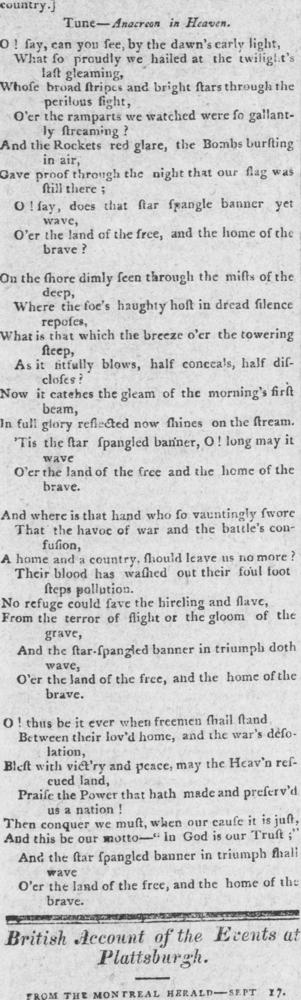
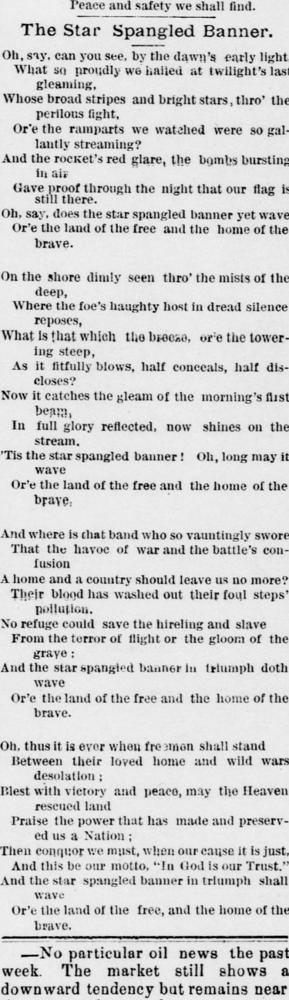
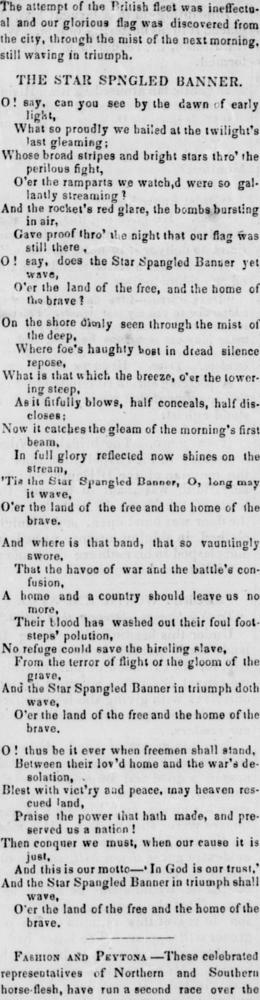
It worked! Some caveats, though. Sometimes, the word coordinates are thrown off by anomalies in the XML. If you adapt this code and find that occasionally it doesn’t render the right portion of the page, that may be why. There’s also a challenge when newspaper articles are cut off by the bottom of the page and continue at the top of the page in the next column. My code doesn’t account for that. So, sometimes, you might get clipping images that cover a broad swath of the page, making them harder to read. I haven’t worked out how to deal with these instances yet. But I may follow up with another post as I polish this pipeline.
In any case, though, now you’ve seen how to programmatically put together images of newspaper clippings on Chronicling America. If you want to borrow this code, by all means, feel free to adapt it and use it for your purposes. I hope it’s helpful.